Dataset Detection on File Systems
Rules and algorithms used by the Zeenea File System connector to identify datasets
Introduction
This document explains how Zeenea detects datasets when scanning file-system–based sources.
The Zeenea File System–type connector analyzes all objects starting from a configured root path and determines whether each object qualifies as a dataset.
- The algorithm traverses folders and files from the root path.
- Each folder is evaluated against a defined set of rules.
- Once a folder is identified as a dataset, its analysis stops.
- The algorithm then proceeds to the next sibling folder.
Folder Containing Only Files
Rule 1 — Folder with only files
Dataset Identified
A folder is considered a dataset if:
- It contains only files
- At least one file has a supported extension
Supported file extensions
csv · parquet · orc · xml · json · avro
| Example A | Example B |
|---|---|
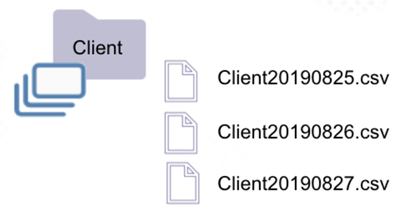 | 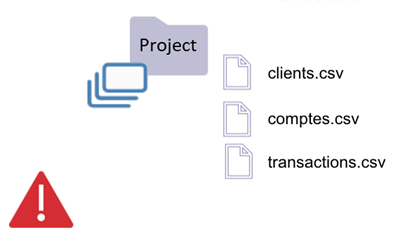 |
| Client folder is a dataset (Rule 1) | Project folder is a dataset (Rule 1) |
| Contains only files | Contains only files |
| At least one supported extension | At least one supported extension |
Schema extracted from most recent file (Client20190827.csv) | Schema extracted from most recent file |
| — | If files are not homogeneous, schema may change on re-analysis |
Folder with Subfolders
Rule 2 — Folder containing non-partition subfolders
Not a Dataset
If a folder contains any subfolder whose name does not follow partition naming conventions, then:
- The parent folder is not a dataset
Rule 3 — File-level datasets inside folders
File Can Be a Dataset
A file can be detected as a dataset even if:
- It resides inside a folder containing subfolders
- The file has a supported extension
| Example A | Example B |
|---|---|
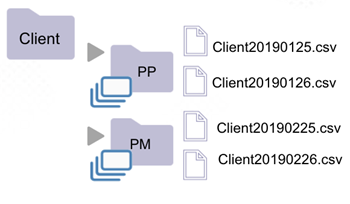 | 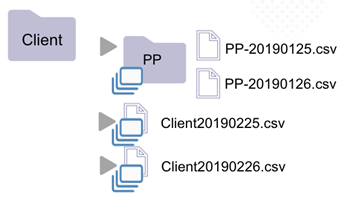 |
| Client folder is not a dataset (Rule 2) | Client folder is not a dataset (Rule 2) |
Contains subfolders PP and PM | Contains subfolder PP |
| Subfolders do not follow partition naming conventions | Subfolder does not follow partition naming conventions |
PP and PM folders are datasets (Rule 1) | PP folder is a dataset (Rule 1) |
| — | Files Client20190225.csv and Client20190226.csv are datasets (Rule 3) |
Folder with Partitions
Rule 4 — Folder containing only partitioned subfolders
Partitioned Dataset Detected
A folder is considered a dataset when both conditions are met:
- All subfolder names follow the partition naming convention
- At least one subfolder would itself be a dataset if isolated
| Valid Partition Example | Mixed Subfolder Example |
|---|---|
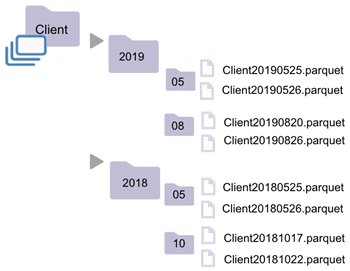 | 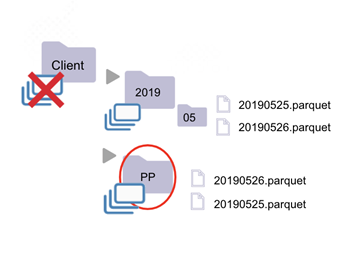 |
| Client folder is a dataset (Rule 4) | Client folder is not a dataset (Rule 2) |
Subfolders 2019 and 2018 follow partition convention | Subfolders PP and 2019 do not both follow partition convention |
2019 would be a dataset if isolated | 2019 is a dataset (Rule 4) |
2019 contains subfolders 05 and 08 | PP is a dataset (Rule 1) |
08 contains only files with supported extensions | — |
Partition Naming Convention
How Zeenea Detects Partitions
Subfolders are recognized as partitions if their names match any of the following regular expressions:
(.*=.*)
[0-9]{8}
[0-9]{4}
[0-9]{2}
0?[1-9]|1[012]
0?[1-9]|1[0-9]|2[0-9]|3[0-1]
Was this page helpful?
Loading editor...